Essential Tips for UVLED Flatbed Printing Success?
The world of UVLED Flatbed Printing is transforming industries with its versatility and quality. Many businesses are eager to adopt this technology, but it comes with its own set of challenges. Understanding these hurdles is crucial for achieving success in this field.
Printing with UVLED technology allows for vibrant colors and sharp images on various substrates. However, navigating the complexities of equipment and material compatibility can be daunting. Some printers struggle with adhesion issues or curing times, which can affect quality.
It's essential to stay informed about the latest advancements and best practices. Experimenting with different materials is key. Each substrate behaves uniquely under UVLED light. Therefore, continuous learning and adaptation are vital for improving results. Embracing trial and error can lead to valuable insights, making your UVLED Flatbed Printing projects more successful.
Understanding UVLED Flatbed Printing Technology
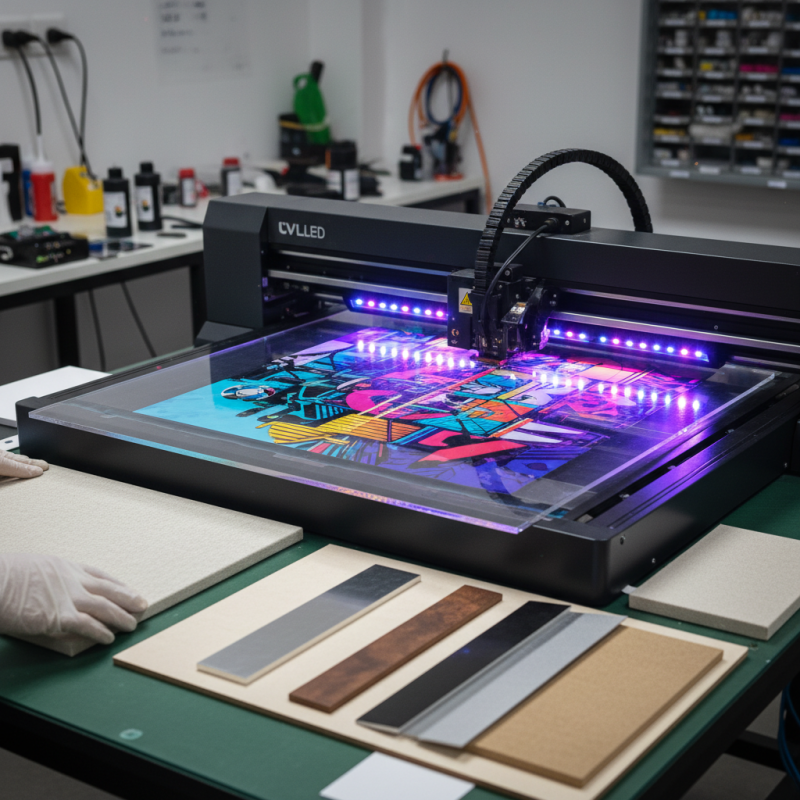
UV LED flatbed printing technology is revolutionizing the printing industry. This method uses ultraviolet light to cure ink instantly. It allows for high-quality prints on various materials. The versatility is impressive; you can print on wood, metal, glass, and more.
When using UV LED technology, it’s essential to maintain the printer regularly. Clean the nozzles often to prevent clogs. Regular maintenance helps achieve consistent print quality. Also, calibrate your printer settings frequently. This step ensures the colors remain accurate and vibrant. Understand that colors might shift slightly after curing. Be prepared for adjustments based on the substrate used.
Another key aspect is selecting the right ink. Not all inks perform well on every material. Testing is crucial. It’s vital to document results to improve future printing. Pay attention to drying time too. Some materials might require longer curing times, causing delays. Embrace trial and error in this process. Observe the printed results closely and learn from imperfections. Remember, each print is an opportunity to refine your technique.
Key Factors Influencing Print Quality in UVLED Printing
In UVLED printing, several key factors significantly influence print quality. The choice of inks, for instance, plays a crucial role. High-quality UV inks ensure better adhesion, color accuracy, and durability. Data shows that using high-grade inks can improve image clarity by up to 30%. However, many printers still opt for cheaper alternatives, leading to subpar results.
The substrate also affects print outcomes. Different materials react differently to UV inks. For example, non-porous surfaces often yield more vivid colors. A study found that prints on glass substrates had an 80% higher color saturation compared to those on wood. Experimentation with various substrates can reveal the optimal combinations, but many fail to test adequately.
Print head settings are another critical factor. Precise adjustments to the height and speed can make or break print quality. Reports indicate that a mere 2mm change in print head distance can shift the final outcome. Still, many operators stick to default settings without considering variations. Recognizing these elements is essential for maximizing the potential of UVLED printing.
Best Practices for Preparing Materials for UVLED Printing
Preparing materials for UVLED printing is crucial. Proper preparation affects print quality significantly. Start by cleaning surfaces thoroughly. Dust, grease, and fingerprints can ruin prints. Use lint-free cloths and suitable solvents to ensure surfaces are pristine.
Consider the material type when preparing. Different substrates require different attention. For example, porous surfaces may need priming. Others might benefit from a coating to enhance adhesion. Test various samples to see what works best for specific materials. Sometimes, errors happen. A poor initial test can lead to wasted time and resources.
Think about the setup too. Ensure the materials are flat and free from warping. A flatbed printer requires a stable base. If material shifts, the print will be misaligned. Conduct regular checks on your setup to prevent these issues. Engage with the process, recognizing that each step has its challenges. It's all part of perfecting your craft in UVLED printing.
Essential Tips for UVLED Flatbed Printing Success
| Material Type | Surface Preparation | Recommended Coating | Ideal Print Settings | Post-Print Treatment |
| Acrylic | Clean with isopropyl alcohol | Primer coating recommended | High resolution, 1440 DPI | Cure under UV light for 30 seconds |
| Wood | Sand surface to a smooth finish | Clear lacquer for sealing | Medium resolution, 600 DPI | Allow to air dry for 24 hours |
| Metal | Clean with degreasing agent | Metal primer coat | High resolution, 1200 DPI | Finish with clear UV coat |
| Canvas | Stretch and secure properly | None needed | Standard resolution, 300 DPI | Avoid direct sunlight for curing |
Optimizing Ink and Curing Settings for Effective Results
Optimizing ink and curing settings is crucial for UVLED flatbed printing success. The right ink can make a significant difference in quality. Always test the ink on similar substrates before a full run. This helps you gauge adherence and color accuracy. If the ink smudges or fades, you must adjust your curing settings.
Curing settings also play a vital role. The light intensity and exposure time affect how well the ink adheres. A too short exposure may lead to inconsistent results. Too long, and you risk warping or damaging the substrate. Keep a log of settings for different materials. Experimentation is key, but don’t forget to document what works and what doesn’t.
Don't overlook cleanliness in your workflow. Dust and debris can interfere with ink consistency. Regularly clean your print head and surfaces. This might add to your prep time, but it significantly impacts the final product. Sometimes, it takes a few missteps to find the best balance in your process. Adapt and refine as you go!
Maintaining Your UVLED Flatbed Printer for Longevity and Performance
Maintaining a UVLED flatbed printer is crucial for both longevity and performance. Regular upkeep can significantly enhance print quality and avoid costly repairs. The first step is to keep the printer clean. Dust and debris can impact performance. Use a soft cloth for exterior surfaces. For internal parts, a gentle vacuum can help. Watch for residue build-up, especially in the ink paths.
Another key point is monitoring ink levels. Low ink can lead to inconsistent prints. Inspect cartridges regularly and replace them as needed. Sometimes, printed materials may look off due to aging ink. Always use fresh supplies.
Additionally, calibrate your printer routinely. Calibration ensures the prints match your expectations. Without it, colors may appear dull or skewed. Setting aside time for maintenance can help prevent recurring problems. Reflection on these aspects can help improve your processes. A little care now leads to better results later.